> For the complete documentation index, see [llms.txt](https://docs.kinwall.family/llms.txt). Markdown versions of documentation pages are available by appending `.md` to page URLs; this page is available as [Markdown](https://docs.kinwall.family/using-kinwall/events.md).
# Events
 ## The detail sheet
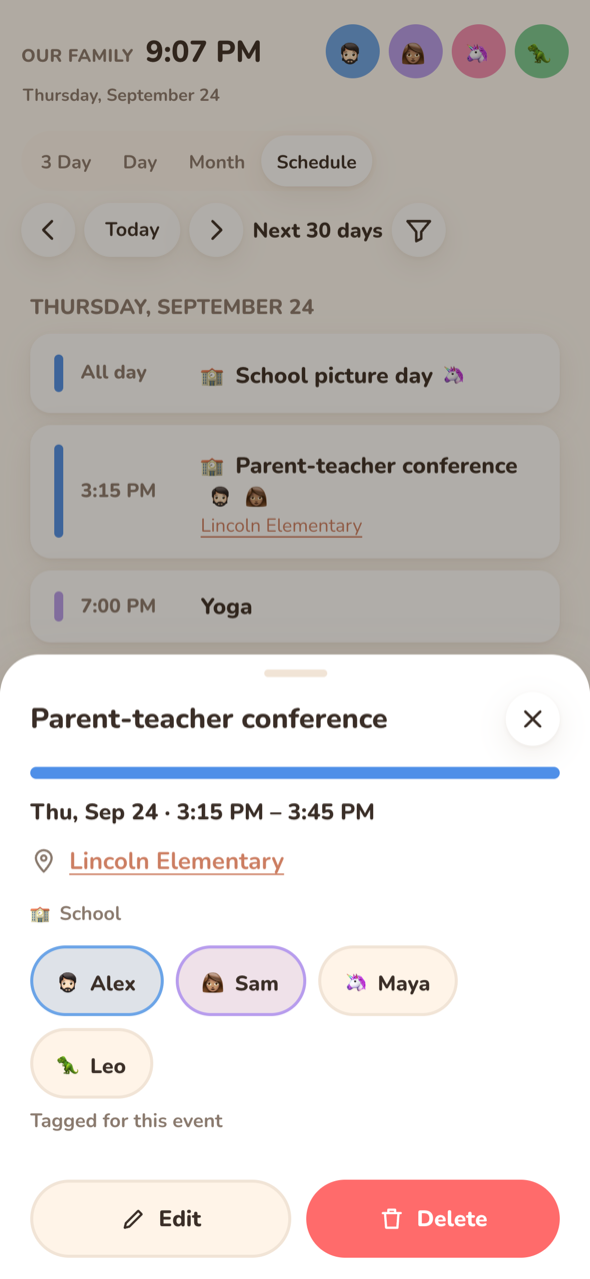
Tap an event to open its sheet. It shows:
* **When**: the date and time range, or "All day". Multi-day all-day events show their date range.
* **Location**: a link. If the location contains a URL (a video-call link), that URL opens. A street address opens Apple Maps on Apple devices and Google Maps elsewhere. Obviously virtual places ("Zoom", "Teams", "online", "TBD") stay plain text.
* **Repeats**, if the event recurs.
* **Category**: "🎂 Birthdays". See [Categories](/using-kinwall/categories.md).
* **Reminder**: "🔔 30 min before". "· default" is added when it comes from the household default.
* **Family member chips**: tap to tag or untag people. See [Members on events](#members-on-events).
* **Description**, always shown as plain text.
* **Tasks**: list items linked to this event. See [Linked tasks](#linked-tasks).
* **Notes**: the family's notes on this event. See [Notes](#notes).
* **Edit** and **Delete**, only on writable calendars. Delete asks for **Confirm delete**. An event from Google or Outlook is deleted there too.
## Creating and editing
Tap **+**, or tap an empty slot in the time grid (this pre-fills the time). The edit sheet has:
| Field | Notes |
| ----------------- | ----------------------------------------------------------------------------------------------------------------------------------------------------------------------------------------------------------------------------------------------------------------------------------------------------- |
| **Title** | Required. |
| **All day** | All-day events are stored as dates. The end date you pick is inclusive. |
| **Starts / Ends** | Native date and time pickers. Moving the start past the end drags the end along. |
| **Calendar** | Only writable, enabled calendars are listed. If you have no local calendar yet, **Kinwall only (not synced)** creates one called "Kinwall". |
| **Location** | Optional. |
| **Who** | Family member chips. |
| **Reminder** | Local, Google and Outlook calendars only. Options: None, 5, 10, 15 or 30 minutes, 1 hour, 1 day, plus **Household default** (local) or **Google calendar default** (Google). Outlook has no "default" to write back. Reminders that came from the provider and don't match a preset stay as they are. |
| **Repeat** | Does not repeat, Daily, Weekly or Monthly. More complex rules from a provider or the API are kept as long as you don't change this menu. |
| **Category** | **Automatic** (keyword or calendar default, with a hint showing which) or a specific category. On a recurring event, **Apply the category to** offers **All events** or **This event**. |
When you edit, only the fields you changed are sent. An unrelated edit never pins an inherited member list or category onto the event, and never restarts a repeating series.
### Recurring events
* **Local recurring events** are one series. Edit and delete apply to the whole series.
* **Synced recurring events** (Google, Outlook, CalDAV) arrive as separate occurrences. Members and category can be set for **This event** or for **All events in the series**. Travel time is per occurrence.
## Reminders
A reminder fires at *start − minutes*. For all-day events it counts back from the start of the day in the household timezone. Reminders are:
* stored on the event for local calendars,
* written through to **Google** (popup reminders) and **Outlook** (a single reminder), so their own apps honour them,
* read-only for CalDAV and ICS events, which use whatever the feed says.
Events without their own reminder use the household **Default reminder** (30 minutes unless changed). See [General](/settings-reference/general.md). An event whose reminder was set to **None** never uses the default. For delivery, see [Notifications](/using-kinwall/notifications.md).
## Travel time and leave-by
An event can have a **travel time** (0–600 minutes). Kinwall then shows a **leave-by** time (start − travel time). The API exposes it as `leaveAt`. If you also turn on **remind before leave**, reminders count back from the leave-by time instead of the start, and the notification reads "Leave by 5:20 PM for Soccer practice · starts 6:00 PM".
* Travel time is **Kinwall-only**: it's never written to Google or Outlook, and it works on read-only calendars too.
* All-day events have no leave-by time.
* On synced recurring events, it's set per occurrence.
* API fields: `travelMinutes`, `remindBeforeLeave` (write) and `leaveAt` (read), on `POST/PATCH /api/events` and the MCP `create_event` / `update_event` tools.
## Members on events
An event's people come from, in order:
1. a tag on **this event** ("Tagged for this event"),
2. a tag on **the whole series** ("Tagged for the whole series"),
3. the **calendar's** members ("From the calendar").
Tapping chips in the detail sheet saves immediately, even on read-only ICS events, because tags are stored only in Kinwall. On a recurring synced event, Kinwall asks **This event** or **All events in the series** first.
## Linked tasks
The **Tasks** block in the detail sheet lists [list items](/using-kinwall/lists.md) linked to the event, open ones first.
* Tick a task to mark it done.
* Tap **+ Add task**, type the task, pick a list, and press Enter to add a linked item. Kinwall remembers the list you used last. Escape (or leaving the field empty) folds the form away again.
* The daily summary notification includes "To do for today's events", up to three open tasks per event.
## Notes
Anyone can leave a note on an event: "Bring shin guards", "I can drive", a link to the snack sign-up. Notes sit under **Tasks** in the detail sheet, oldest first, each with the poster's avatar and name in their colour and a coloured bar down the side, plus when it was posted ("5 min. ago") and "· edited" once changed. Links in a note open in a new tab.
* **+ Add note** opens a text box and **Post as** chips. The chip starts on the person selected in the header, else whoever you posted as last. **Someone** posts without a name. Separate thoughts are separate notes.
* Tap a note (or its **Edit**) to change the text, then **Save**, **Cancel** or **Delete** (which asks first). Escape cancels.
* In **Schedule**, an event with notes shows 💬 and the count.
* A recurring local event keeps one thread for the whole series. A synced event's notes survive every sync, because synced events keep the same Kinwall id; if an event drops out of the feed, its notes wait and come back with it. Deleting an event in Kinwall deletes its notes.
* Notes are Kinwall-only and never go to Google or Outlook. Export includes notes on local events (and list items); notes on synced events are not exported.
* API: `GET /api/notes?target=event:`, `POST /api/notes` `{target, body, memberId?}` (1–2000 characters; no `memberId` = "Someone"), `PATCH /api/notes/{id}` `{body}`, `DELETE /api/notes/{id}`. Events from `GET /api/events` carry `noteCount`. Display keys can read and write notes. MCP: `list_notes`, `add_note`, `update_note`.
## Kinwall-only vs synced fields
| Stays in Kinwall | Goes to the provider (writable calendars) |
| -------------------------------------------------------------- | ----------------------------------------------------------------------------------- |
| Members, category, travel time / leave-by, linked tasks, notes | Title, time, all-day, location, description, recurrence, reminders (Google/Outlook) |
When an event is read-only, the sheet says: "Only the family members and travel time are saved in Kinwall — the event itself comes from *calendar name*". For how that's decided, see [Writable vs read-only](/connecting-calendars/writable-vs-read-only.md).
---
# Agent Instructions
This documentation is published with GitBook. GitBook is the documentation platform designed so that both humans and AI agents can read, navigate, and reason over technical content effectively. Learn more at gitbook.com.
## Querying This Documentation
If you need additional information that is not directly available in this page, you can query the documentation dynamically by asking a question.
Perform an HTTP GET request on the current page URL with the `ask` query parameter, and the optional `goal` query parameter:
```
GET https://docs.kinwall.family/using-kinwall/events.md?ask=&goal=
```
`ask` is the immediate question: it should be specific, self-contained, and written in natural language.
`goal` is optional and describes the broader end goal you are ultimately trying to accomplish on behalf of the user. GitBook uses it to tailor the answer towards what is most useful for that goal.
The response will contain a direct answer to the question and relevant excerpts and sources from the documentation.
Use this mechanism when the answer is not explicitly present in the current page, you need clarification or additional context, or you want to retrieve related documentation sections.
## The detail sheet
Tap an event to open its sheet. It shows:
* **When**: the date and time range, or "All day". Multi-day all-day events show their date range.
* **Location**: a link. If the location contains a URL (a video-call link), that URL opens. A street address opens Apple Maps on Apple devices and Google Maps elsewhere. Obviously virtual places ("Zoom", "Teams", "online", "TBD") stay plain text.
* **Repeats**, if the event recurs.
* **Category**: "🎂 Birthdays". See [Categories](/using-kinwall/categories.md).
* **Reminder**: "🔔 30 min before". "· default" is added when it comes from the household default.
* **Family member chips**: tap to tag or untag people. See [Members on events](#members-on-events).
* **Description**, always shown as plain text.
* **Tasks**: list items linked to this event. See [Linked tasks](#linked-tasks).
* **Notes**: the family's notes on this event. See [Notes](#notes).
* **Edit** and **Delete**, only on writable calendars. Delete asks for **Confirm delete**. An event from Google or Outlook is deleted there too.
## Creating and editing
Tap **+**, or tap an empty slot in the time grid (this pre-fills the time). The edit sheet has:
| Field | Notes |
| ----------------- | ----------------------------------------------------------------------------------------------------------------------------------------------------------------------------------------------------------------------------------------------------------------------------------------------------- |
| **Title** | Required. |
| **All day** | All-day events are stored as dates. The end date you pick is inclusive. |
| **Starts / Ends** | Native date and time pickers. Moving the start past the end drags the end along. |
| **Calendar** | Only writable, enabled calendars are listed. If you have no local calendar yet, **Kinwall only (not synced)** creates one called "Kinwall". |
| **Location** | Optional. |
| **Who** | Family member chips. |
| **Reminder** | Local, Google and Outlook calendars only. Options: None, 5, 10, 15 or 30 minutes, 1 hour, 1 day, plus **Household default** (local) or **Google calendar default** (Google). Outlook has no "default" to write back. Reminders that came from the provider and don't match a preset stay as they are. |
| **Repeat** | Does not repeat, Daily, Weekly or Monthly. More complex rules from a provider or the API are kept as long as you don't change this menu. |
| **Category** | **Automatic** (keyword or calendar default, with a hint showing which) or a specific category. On a recurring event, **Apply the category to** offers **All events** or **This event**. |
When you edit, only the fields you changed are sent. An unrelated edit never pins an inherited member list or category onto the event, and never restarts a repeating series.
### Recurring events
* **Local recurring events** are one series. Edit and delete apply to the whole series.
* **Synced recurring events** (Google, Outlook, CalDAV) arrive as separate occurrences. Members and category can be set for **This event** or for **All events in the series**. Travel time is per occurrence.
## Reminders
A reminder fires at *start − minutes*. For all-day events it counts back from the start of the day in the household timezone. Reminders are:
* stored on the event for local calendars,
* written through to **Google** (popup reminders) and **Outlook** (a single reminder), so their own apps honour them,
* read-only for CalDAV and ICS events, which use whatever the feed says.
Events without their own reminder use the household **Default reminder** (30 minutes unless changed). See [General](/settings-reference/general.md). An event whose reminder was set to **None** never uses the default. For delivery, see [Notifications](/using-kinwall/notifications.md).
## Travel time and leave-by
An event can have a **travel time** (0–600 minutes). Kinwall then shows a **leave-by** time (start − travel time). The API exposes it as `leaveAt`. If you also turn on **remind before leave**, reminders count back from the leave-by time instead of the start, and the notification reads "Leave by 5:20 PM for Soccer practice · starts 6:00 PM".
* Travel time is **Kinwall-only**: it's never written to Google or Outlook, and it works on read-only calendars too.
* All-day events have no leave-by time.
* On synced recurring events, it's set per occurrence.
* API fields: `travelMinutes`, `remindBeforeLeave` (write) and `leaveAt` (read), on `POST/PATCH /api/events` and the MCP `create_event` / `update_event` tools.
## Members on events
An event's people come from, in order:
1. a tag on **this event** ("Tagged for this event"),
2. a tag on **the whole series** ("Tagged for the whole series"),
3. the **calendar's** members ("From the calendar").
Tapping chips in the detail sheet saves immediately, even on read-only ICS events, because tags are stored only in Kinwall. On a recurring synced event, Kinwall asks **This event** or **All events in the series** first.
## Linked tasks
The **Tasks** block in the detail sheet lists [list items](/using-kinwall/lists.md) linked to the event, open ones first.
* Tick a task to mark it done.
* Tap **+ Add task**, type the task, pick a list, and press Enter to add a linked item. Kinwall remembers the list you used last. Escape (or leaving the field empty) folds the form away again.
* The daily summary notification includes "To do for today's events", up to three open tasks per event.
## Notes
Anyone can leave a note on an event: "Bring shin guards", "I can drive", a link to the snack sign-up. Notes sit under **Tasks** in the detail sheet, oldest first, each with the poster's avatar and name in their colour and a coloured bar down the side, plus when it was posted ("5 min. ago") and "· edited" once changed. Links in a note open in a new tab.
* **+ Add note** opens a text box and **Post as** chips. The chip starts on the person selected in the header, else whoever you posted as last. **Someone** posts without a name. Separate thoughts are separate notes.
* Tap a note (or its **Edit**) to change the text, then **Save**, **Cancel** or **Delete** (which asks first). Escape cancels.
* In **Schedule**, an event with notes shows 💬 and the count.
* A recurring local event keeps one thread for the whole series. A synced event's notes survive every sync, because synced events keep the same Kinwall id; if an event drops out of the feed, its notes wait and come back with it. Deleting an event in Kinwall deletes its notes.
* Notes are Kinwall-only and never go to Google or Outlook. Export includes notes on local events (and list items); notes on synced events are not exported.
* API: `GET /api/notes?target=event:`, `POST /api/notes` `{target, body, memberId?}` (1–2000 characters; no `memberId` = "Someone"), `PATCH /api/notes/{id}` `{body}`, `DELETE /api/notes/{id}`. Events from `GET /api/events` carry `noteCount`. Display keys can read and write notes. MCP: `list_notes`, `add_note`, `update_note`.
## Kinwall-only vs synced fields
| Stays in Kinwall | Goes to the provider (writable calendars) |
| -------------------------------------------------------------- | ----------------------------------------------------------------------------------- |
| Members, category, travel time / leave-by, linked tasks, notes | Title, time, all-day, location, description, recurrence, reminders (Google/Outlook) |
When an event is read-only, the sheet says: "Only the family members and travel time are saved in Kinwall — the event itself comes from *calendar name*". For how that's decided, see [Writable vs read-only](/connecting-calendars/writable-vs-read-only.md).
---
# Agent Instructions
This documentation is published with GitBook. GitBook is the documentation platform designed so that both humans and AI agents can read, navigate, and reason over technical content effectively. Learn more at gitbook.com.
## Querying This Documentation
If you need additional information that is not directly available in this page, you can query the documentation dynamically by asking a question.
Perform an HTTP GET request on the current page URL with the `ask` query parameter, and the optional `goal` query parameter:
```
GET https://docs.kinwall.family/using-kinwall/events.md?ask=&goal=
```
`ask` is the immediate question: it should be specific, self-contained, and written in natural language.
`goal` is optional and describes the broader end goal you are ultimately trying to accomplish on behalf of the user. GitBook uses it to tailor the answer towards what is most useful for that goal.
The response will contain a direct answer to the question and relevant excerpts and sources from the documentation.
Use this mechanism when the answer is not explicitly present in the current page, you need clarification or additional context, or you want to retrieve related documentation sections.